[proxmox] Fixing "CPU does not support x86-64-v2"
Modern container images require x86-64-v2. The default CPU model your hypervisor hands a VM does not have those instructions, so the process dies inside glibc before the application ever runs.
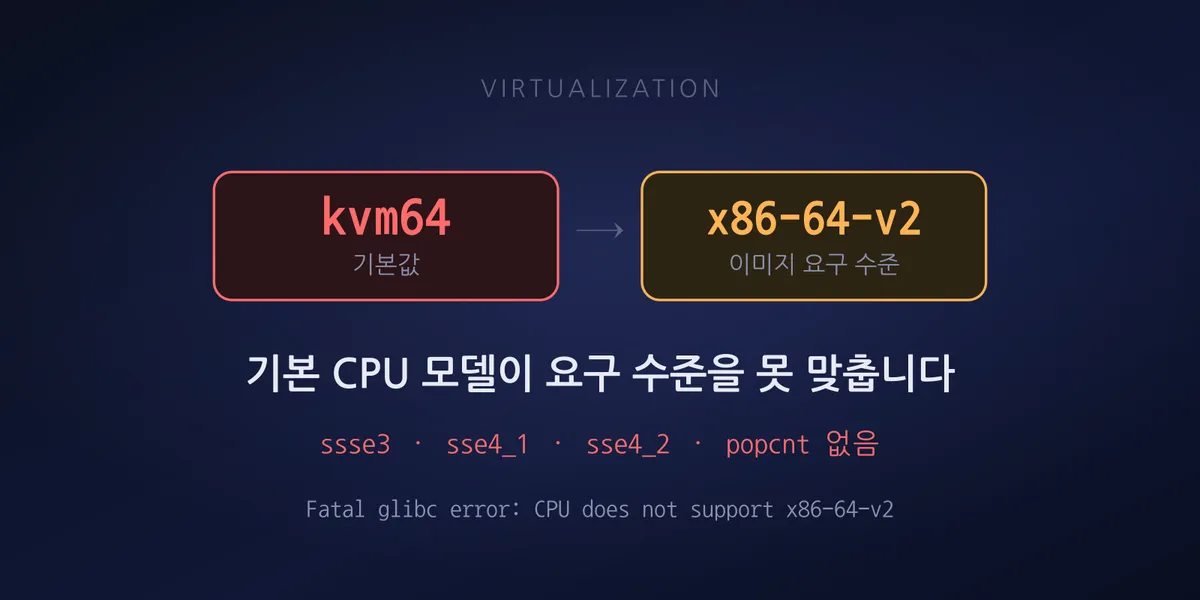
We brought up a stack on a freshly created VM and one object-storage container stayed unhealthy. The log had exactly one line:
Fatal glibc error: CPU does not support x86-64-v2Assuming a misconfiguration, we went through the environment variables again. But this message does
not come from the application. glibc emits it before the binary even reaches main().
This is not an application error
glibc can be built to require a given microarchitecture level. A binary built that way checks CPU features at load time and dies on the spot if they are missing.
Which gives the error these traits:
- It appears on the container’s first line of stdout, not in application logs
- No configuration change makes any difference
- The same image runs fine on a different server
The third one is what misleads people. It is not the image and not the config, so all that is left is the environment — and “environment” is not usually a category people expect the CPU to fall into.
x86-64 microarchitecture levels
x86-64 groups generational instruction sets into levels. v1 is the original x86-64 baseline; v2
covers instructions that became common around 2009.
The v2 requirements that are easiest to check in practice:
cx16, lahf_lm, popcnt, sse3(pni), sse4_1, sse4_2, ssse3On physical servers this is rarely a concern — anything less than a decade or so old satisfies all of it. Virtualization is where it bites.
The default was the problem
If you do not specify a CPU type when creating a VM, the hypervisor picks a default. You can see exactly what it chose by looking at the process arguments on the host.
tr '\0' ' ' < /proc/$(pgrep -f "kvm -id 100")/cmdline | grep -o '\-cpu [^ ]*'The result:
-cpu kvm64,enforce,+kvm_pv_eoi,+kvm_pv_unhalt,+lahf_lm,+sepkvm64. Inside a guest running on that model, CPU info reads:
model name : Common KVM processor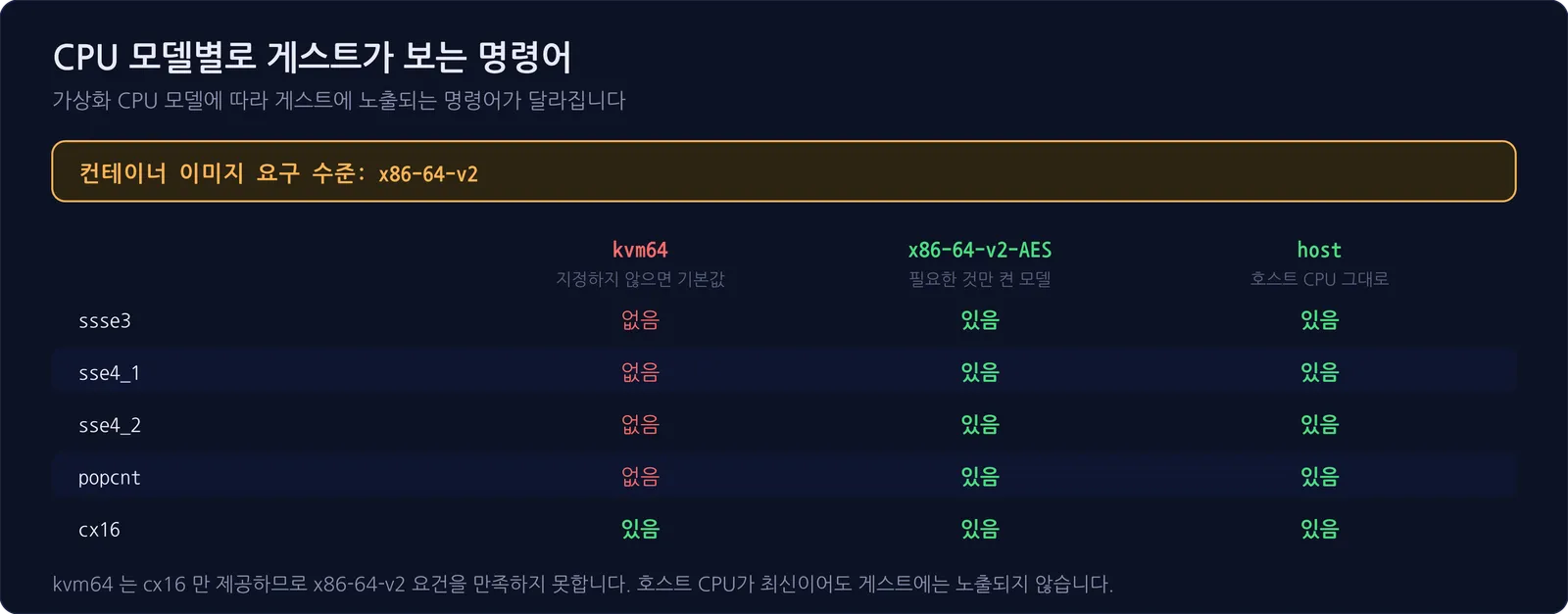
The CPU name the guest sees also differs per model, which alone is enough to guess which one you are on.
| CPU model | Guest model name |
|---|---|
kvm64 (default) |
Common KVM processor |
x86-64-v2-AES |
QEMU Virtual CPU version 2.5+ |
host |
the host CPU name verbatim |
kvm64 provides cx16 but is missing everything from ssse3 through sse4_2. It does not meet
the x86-64-v2 requirement. However modern the host CPU is, those instructions are not exposed to
the guest.
On the same host, a VM configured with x86-64-v2-AES comes up as:
-cpu qemu64,+aes,enforce,+kvm_pv_eoi,+kvm_pv_unhalt,+pni,+popcnt,+sse4.1,+sse4.2,+ssse3The flags are added explicitly — the hypervisor turning on each item v2 needs.
What to switch to
Two main options.
host exposes the host CPU’s features directly. Best performance, and any image will run. The
cost is that you cannot live-migrate to a node with a different CPU, since instructions the guest
is already using may not exist on the target.
x86-64-v2-AES is a named model with just the required instructions enabled. Migration keeps
working across mixed CPU generations as long as every node uses the same model.
We chose host here. This VM’s disk is on local storage tied to one node, so migration was
impossible anyway. When a constraint already exists, take the better-performing option.
Conversely, for a VM that moves between nodes, host will bite you later. The moment you need to
migrate is usually not a planned one — it is when a node has a problem.
One caveat: changing the CPU type requires a reboot. It does not apply to a running VM, so if the machine is in service you need a restart window.
How to check
Two places.
On the host, what CPU model the VM actually started with:
tr '\0' ' ' < /proc/$(pgrep -f "kvm -id <VMID>")/cmdline | grep -o '\-cpu [^ ]*'Inside the guest, whether the flags you need are visible:
grep -m1 'model name' /proc/cpuinfo
for f in ssse3 sse4_1 sse4_2 popcnt cx16 lahf_lm; do
  printf '%-8s %s\n' "$f" "$(grep -qw $f /proc/cpuinfo && echo yes || echo no)"
done
If the config file has no CPU type entry, you are on the default. Counting one node, 8 of 9 VMs
had no CPU type specified. Nothing had broken so far only because the images running on them did
not require v2.
Why it took so long to find
We started from the wrong premise. One container was unhealthy, so we assumed it was that container’s problem and dug through image tags and environment variables first.
The error message contained the word glibc and we did not stop to consider what that meant. If
the runtime raised the error rather than the application, the cause lies outside the application.
Identifying who emitted the message would have taken us to the CPU far sooner.
Symptoms pointing somewhere other than the cause is a recurring pattern. In
Fixing ssh “Connection timed out during banner exchange”,
a port scan reporting open is precisely what removed the firewall from suspicion.
To summarize: if a low-level error unrelated to the application appears when you put a modern image on an older VM, it is worth checking when and with what settings that VM was created. A VM built a few years ago is usually still on defaults, and those defaults were not chosen with today’s images in mind.
For the case where a default silently consumes resources instead, see pg_wal that will not shrink — start with replication slots. There the default was “unlimited.”