[postgresql] pg_wal that will not shrink — start with replication slots
PostgreSQL will not delete WAL while a replication slot still holds it. Two months of WAL accumulated after a standby died, and the secondary damage that only surfaced once the space came back.
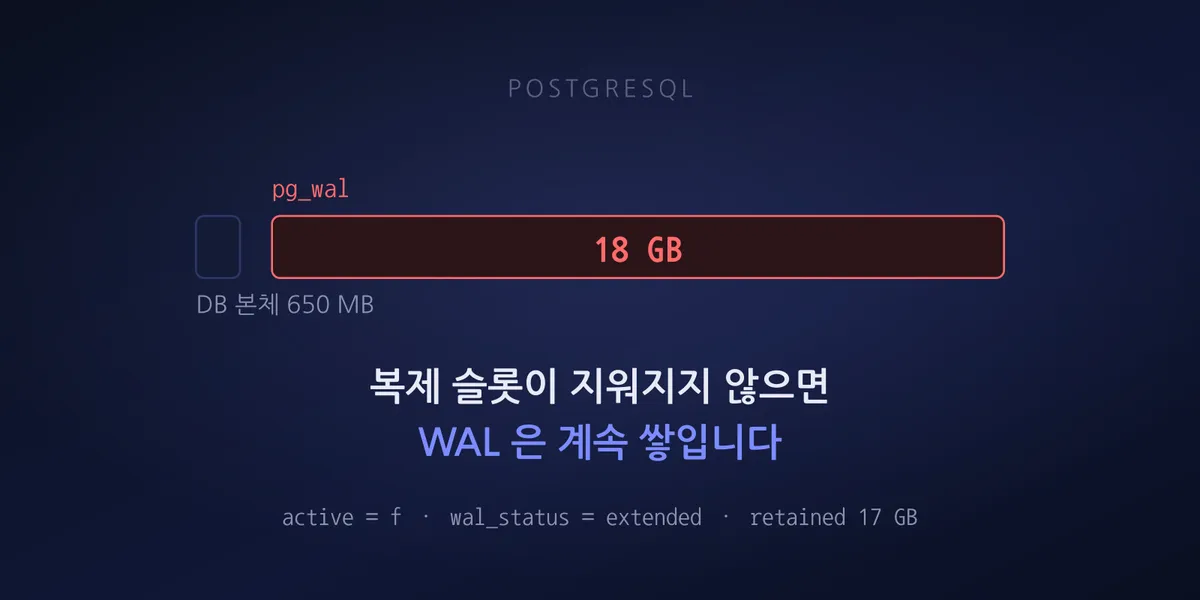
Disk at 91 percent — 26GB of 30GB used. The database itself was 650MB.
What filled the rest was pg_wal: 18GB across 1,099 files. The oldest was dated two months earlier.
A replication slot is a contract to retain WAL
A PostgreSQL replication slot prevents the primary from deleting WAL a standby has not consumed yet. It is a safety mechanism so a standby that drops off briefly can reconnect and catch up.
The problem is that the contract has no expiry by default. Even if the standby never returns, the primary keeps retaining WAL as long as the slot exists.
This server’s settings show the relationship plainly.
max_wal_size           = 1024MB
max_slot_wal_keep_size = -1
max_wal_size was 1GB while actual pg_wal was 18GB. max_wal_size is a target that governs
checkpoint frequency, not a ceiling — and it has no power over WAL a slot is holding.
max_slot_wal_keep_size, added in PostgreSQL 13, is the actual ceiling on how much WAL a slot may
retain. Past that limit the slot is invalidated and WAL gets deleted normally. The standby can no
longer catch up, but the primary survives. The default is -1: unlimited. This server was on
the default. An untouched default becoming a problem years later is the same pattern as
Fixing “CPU does not support x86-64-v2”.
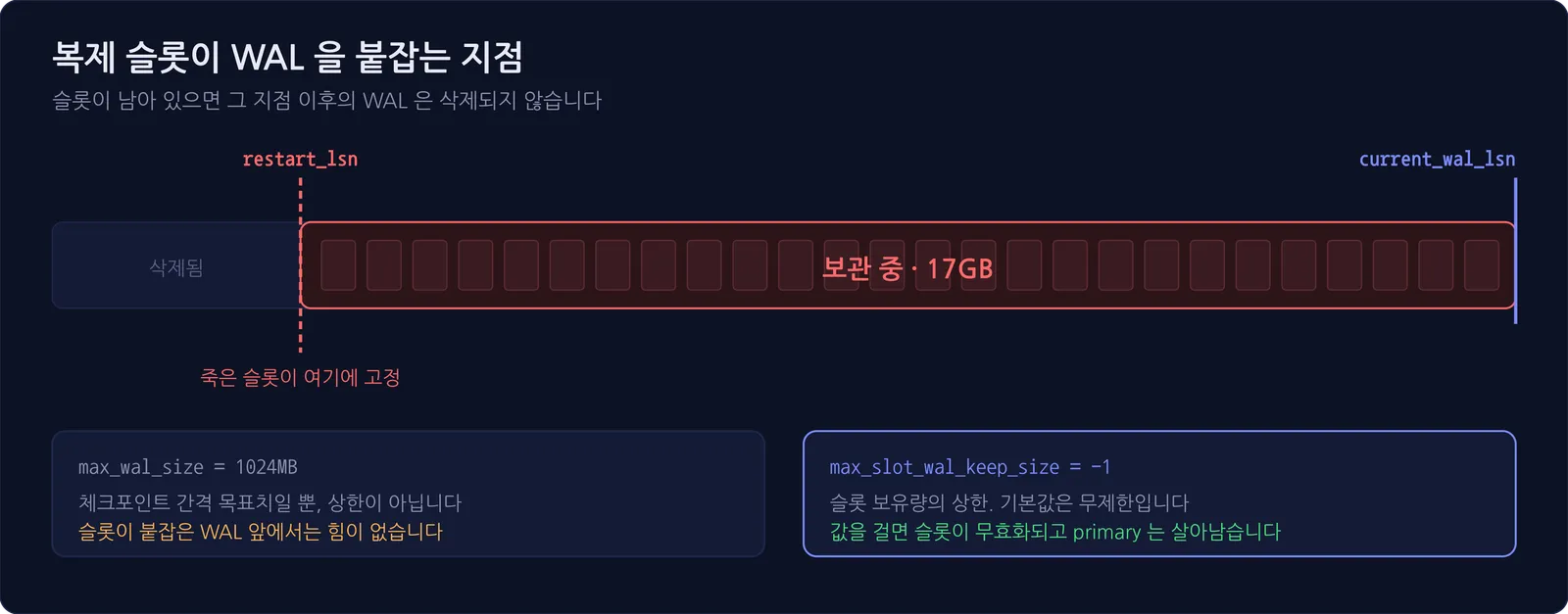
In short: if you decommission a standby without dropping its slot, the disk starts filling from that moment. And it makes no noise until the disk is full.
With several standbys or several operators, setting a tolerable max_slot_wal_keep_size is more
reliable than remembering to clean up each slot. Think of it as deciding in advance which is worse:
replication breaking, or the primary’s disk filling.
Diagnosis is one query
SELECT slot_name, slot_type, active, wal_status,
       pg_size_pretty(pg_wal_lsn_diff(pg_current_wal_lsn(), restart_lsn)) AS retained
  FROM pg_replication_slots;
The result:
 slot_name | slot_type | active | wal_status | retained
-----------+-----------+--------+------------+----------
 standby_1 | physical  | f      | extended   | 17 GB
active = f means nothing is connected through this slot. Checking pg_stat_replication returned
zero rows. No standby attached at all, and the slot alone was holding 17GB.
wal_status of extended is also a signal — it marks WAL retained beyond max_wal_size because of
a slot.
Reclaiming
If you have no plan to revive the standby, drop the slot.
SELECT pg_drop_replication_slot('standby_1');
CHECKPOINT;
We ran CHECKPOINT twice. A checkpoint has to run before WAL segments that are no longer needed are
actually deleted or recycled.
| Item | Before | After |
|---|---|---|
| WAL files | 1,099 | 34 |
pg_wal size |
18GB | 513MB |
| Disk usage | 91 percent (2.7GB free) | 31 percent (20GB free) |
One practical trap: passing this command as a one-liner through SSH and a container exec caused the
double quotes to be interpreted as a PostgreSQL identifier, failing with
column "standby_1" does not exist. When shells nest several layers deep, do not trust quoting —
put the SQL in a file and pass it with psql -f.
Reclaiming space was not the end
Even after the disk was clear, one cache container still would not start. The log showed a different cause now.
Bad file format reading the append only file appendonly.aof.122.incr.aofWrites to the append-only file had been truncated while the disk was full, corrupting it. The restart count was 8,480, and it had been in that state for 11 days. Recovery used the official tool.
valkey-check-aof --fix appendonly.aof.manifestTrimming the damaged tail — 18,392,008 bytes of 24,171,248, leaving 5,779,240 — brought it up cleanly. Being a cache, the truncated data did not matter.
The lesson: a full disk is the primary symptom, and whatever was writing during that window carries secondary damage. Do not treat reclaiming space as the end of the incident. List the processes that were writing while the disk was full and verify each one’s integrity.
Why there were no alerts for two months
This server was not in the automated check list. So nobody knew about the disk at 91 percent, or the container restarting 8,480 times.
When adding checks, we did not settle for disk utilization — we added the causal metrics directly.
| Check | Threshold | Why |
|---|---|---|
| WAL retained by inactive slots | 2GB | The direct cause here. Catches it before the disk fills |
Total pg_wal size |
8GB | Catches accumulation from causes other than slots |
| Disk utilization | 85 percent | Last line of defense |
| Containers not in running state | any | Catches restart loops early |
Watching only disk utilization would have meant finding out at 91 percent again. Monitoring the cause rather than the outcome catches it far earlier.
In Fixing ssh “Connection timed out during banner exchange” the decisive evidence was likewise not service status but the packet counters on iptables rules. The closer a number sits to the cause, the sooner it tells you something.
Zero alerts does not mean everything is fine
We added the new checks, ran them, and got zero alerts. Stopping there is a mistake. Zero can mean “healthy” or “the check silently failed to read a value.” Both look identical in the log.
So we deliberately lowered the thresholds and ran again.
disk 31 percent (threshold 1 percent)        → alert fired
inactive slot WAL 0MB (threshold 0MB)        → alert fired
That confirmed the values are actually being read and the evaluation logic works. Restoring the thresholds gave zero again — and this time zero means healthy.
Every new check should be made to fire on purpose at least once. A check you have never seen fire is not monitoring; it is just code.
Checklist
If you run replication, two things are worth checking right now.
- Whether
pg_replication_slotscontains any slot withactive = f— and if so, whether that standby still exists - Whether your standby decommissioning runbook includes dropping the slot
Dropping a slot means that standby has to be rebuilt from a base backup. If you plan to revive it, recover the standby first rather than dropping the slot. But the disk keeps filling in the meantime, so weigh the remaining free space against how long recovery will take.